
Layering the Gaussian Frosting

There has almost always been a demand to pull meshes out of radiance fields. When Antoine Guédon and Vincent Lepetit first released SuGaR,

There has almost always been a demand to pull meshes out of radiance fields. When Antoine Guédon and Vincent Lepetit first released SuGaR,

Michael Rubloff

Michael Rubloff

Michael is the Founder and Managing Editor of Radiancefields.com

Gaussian Frosting

There has almost always been a demand to pull meshes out of radiance fields. When Antoine Guédon and Vincent Lepetit first released SuGaR, there was considerable excitement because of the accuracy of meshes that they were pulling from Gaussian Splatting. Now they return with a step forward, bringing Gaussian Frosting to the table.

Antoine’s penchant for whimsically naming his groundbreaking algorithms after confections—SuGaR, MACARONS, SCONE—paints a picture of a creator blending technical prowess with a touch of culinary creativity.
Gaussian Frosting

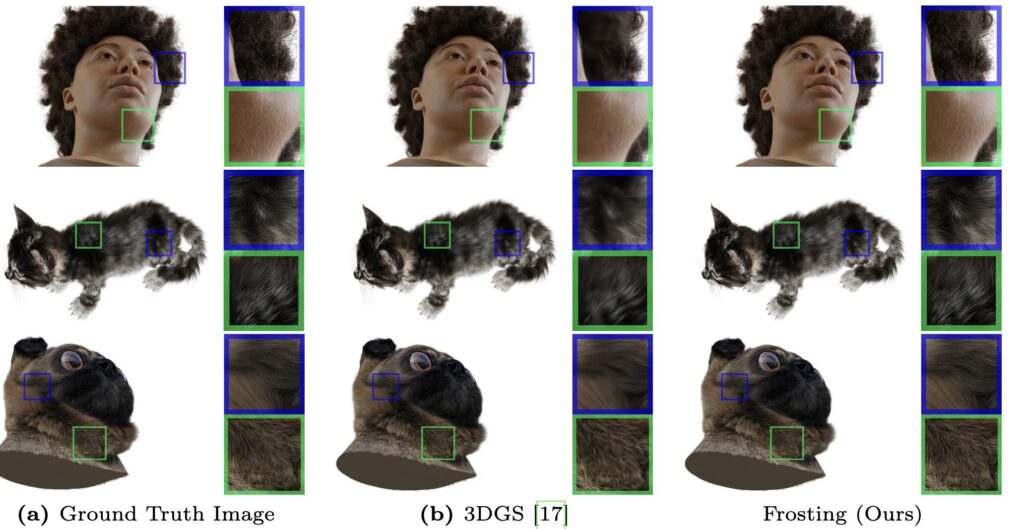
This is a direct follow up to the previous paper of SuGaR, which pulled high quality meshes from Gaussian Splatting scenes. However, Frosting steps it up a notch by more accurately modeling fuzzy details and occlusions more accurately. This also translates well to to rendering and editing of these hyperrealistic scenes. To give some additional context, SuGaR was released at the end of last year and we’re already seeing the follow up, so things are moving fast.

Gaussian Frosting is built upon the foundation of 3D Gaussian Splatting (3DGS) and enhances it by introducing a structured approach to managing the Gaussians. Unlike previous methods, which might flatten Gaussians against the mesh surface, thus losing depth and detail, Gaussian Frosting retains these details by strategically placing and optimizing Gaussians within the adaptive layer. The process involves creating a base mesh that captures the scene’s general geometry. This mesh serves as the foundation upon which the Frosting layer is built.

This process begins with a detailed analysis of two types of Gaussians: regularized and unconstrained. Regularized Gaussians are tightly aligned with the base mesh, ensuring a structured adherence to the scene’s geometry. In contrast, unconstrained Gaussians roam freely, capturing the volumetric subtleties of the scene without being bound to the mesh.

Initially, the Gaussians are optimized without constraint (as with SuGaR), to let them position themselves. Then, regularization is applied to these Gaussians (thus obtaining the regularized Gaussians that should be aligned with the surface) and a surface mesh is extracted. The idea is to look back at the “unconstrained” Gaussians (the Gaussians before regularization is applied, which have useful information about the volumetric effects in the scene) to determine an optimal thickness for the Frosting around the mesh.

The distribution of the regularized Gaussians is also used for computing the Frosting layer, as it is useful to know what part of the scene are well reconstructed as surfaces. Indeed, just using unconstrained Gaussians could produce a noisy/unnecessarily thick layer in areas where it is not needed.

Regularized Gaussians are helpful to filter noise and identify areas where volumetric rendering is really needed; then, the information from the unconstrained Gaussians is used to compute a refined/precise thickness for the layer.

After building the initial frosting layer (using the unconstrained and regularized Gaussians), they sample a densified set of Gaussians in the layer, which is further refined. The user can choose the number of Gaussians to sample and thus gains a lot of control on the required resources.

The steps can be detailed as follows:

  1. Unconstrained optimization

  2. Save unconstrained Gaussians in memory because it has useful information

  3. Regularize Gaussians

  4. Extract mesh from regularized Gaussians

  5. Build the initial Frosting layer using the two sets of Gaussians

  6. Sample a densified set of Gaussians in the layer

  7. Refine layer

The brilliance of this approach is in how it dynamically adjusts the Frosting layer’s thickness in real-time, ensuring each Gaussian’s contribution is maximized for the desired visual outcome. This not only enhances the scene’s realism by preserving intricate details and occlusions but also improves rendering efficiency by allocating resources where they are most needed. By intelligently varying the layer’s thickness based on the underlying material’s properties, Gaussian Frosting achieves a level of detail and realism previously unattainable, all while streamlining the rendering process for real-time applications.

This adaptability extends to editing and animation, wherein modifications to the base mesh automatically translate into adjustments in the Frosting layer, maintaining the scene’s realism without the need for extensive manual tweaking.

Gaussian Frosting’s training time ranges from 45 to 90 minutes on a single NVIDIA Tesla V100 GPU, but can become accessible to a wide range of users by specifying the number of Gaussians to sample in the Frosting layer, so in practice you can adapt Frosting to a less powerful GPU.

The code has not yet been released, but will be coming soon. For a deeper dive into Gaussian Frosting and its capabilities, including a visual demonstration of its impact on scene rendering and editing, check out the original project page, which showcases the method in action, offering a tangible glimpse into the future of computer graphics.

Featured

Recents

Platforms

Niantic Spatial Launches the Places Library of 100 Simulation-Ready Real-World Environments

Niantic Spatial launches the Places Library, 100 real-world environments shipped as USDZ packages pairing a Gaussian splat with a collision mesh for Isaac Sim.

Michael Rubloff

Oct 4, 2026

Platforms

Niantic Spatial Launches the Places Library of 100 Simulation-Ready Real-World Environments

Niantic Spatial launches the Places Library, 100 real-world environments shipped as USDZ packages pairing a Gaussian splat with a collision mesh for Isaac Sim.

Michael Rubloff

Platforms

Ronski Adds Source Trimming and Keyframe Extraction to 360 Splat Pro v1.5.0

360 Splat Pro v1.5.0 adds Trim Source in and out points and a fast Keyframes extraction mode, and fixes a sharp frames search window that reached seconds away.

Michael Rubloff

Oct 3, 2026

Platforms

Ronski Adds Source Trimming and Keyframe Extraction to 360 Splat Pro v1.5.0

360 Splat Pro v1.5.0 adds Trim Source in and out points and a fast Keyframes extraction mode, and fixes a sharp frames search window that reached seconds away.

Michael Rubloff

Platforms

PlayCanvas Speeds Up SOG Compression and Fixes PLY Reading in splat-transform v3.9.0

PlayCanvas splat-transform v3.9.0 speeds up GPU k-means for SOG compression on devices without shader-f16 and decodes big-endian PLY while rejecting ASCII.

Michael Rubloff

Oct 3, 2026

Platforms

PlayCanvas Speeds Up SOG Compression and Fixes PLY Reading in splat-transform v3.9.0

PlayCanvas splat-transform v3.9.0 speeds up GPU k-means for SOG compression on devices without shader-f16 and decodes big-endian PLY while rejecting ASCII.

Michael Rubloff

Platforms

Gaussian Splat Patch Brings Clone Stamp and Healing Brushes to Gaussian Splats in Blender

Gaussian Splat Patch is a free Blender 5.3 extension that erases, clone stamps and heals Gaussian splat scans, with hole bridging and non-destructive Restore.

Michael Rubloff

Oct 3, 2026

Platforms

Gaussian Splat Patch Brings Clone Stamp and Healing Brushes to Gaussian Splats in Blender

Gaussian Splat Patch is a free Blender 5.3 extension that erases, clone stamps and heals Gaussian splat scans, with hole bridging and non-destructive Restore.

Michael Rubloff

Trending Articles
  1. TRENDING
    Loading...
  2. TRENDING
    Loading...
  3. TRENDING
    Loading...
Michael Rubloff

Written by Michael Rubloff

Michael is the Founder and Managing Editor of Radiancefields.com

More from Michael Rubloff

More from Michael Rubloff

Platforms

Niantic Spatial Launches the Places Library of 100 Simulation-Ready Real-World Environments

Niantic Spatial launches the Places Library, 100 real-world environments shipped as USDZ packages pairing a Gaussian splat with a collision mesh for Isaac Sim.

Michael Rubloff

Oct 4, 2026

Niantic Spatial

Platforms

Niantic Spatial Launches the Places Library of 100 Simulation-Ready Real-World Environments

Michael Rubloff

Oct 4, 2026

Niantic Spatial

Platforms

Niantic Spatial Launches the Places Library of 100 Simulation-Ready Real-World Environments

Niantic Spatial launches the Places Library, 100 real-world environments shipped as USDZ packages pairing a Gaussian splat with a collision mesh for Isaac Sim.

Michael Rubloff

Oct 4, 2026

Niantic Spatial

Platforms

Ronski Adds Source Trimming and Keyframe Extraction to 360 Splat Pro v1.5.0

360 Splat Pro v1.5.0 adds Trim Source in and out points and a fast Keyframes extraction mode, and fixes a sharp frames search window that reached seconds away.

Michael Rubloff

Oct 3, 2026

360 Splat Pro

Platforms

Ronski Adds Source Trimming and Keyframe Extraction to 360 Splat Pro v1.5.0

Michael Rubloff

Oct 3, 2026

360 Splat Pro

Platforms

Ronski Adds Source Trimming and Keyframe Extraction to 360 Splat Pro v1.5.0

360 Splat Pro v1.5.0 adds Trim Source in and out points and a fast Keyframes extraction mode, and fixes a sharp frames search window that reached seconds away.

Michael Rubloff

Oct 3, 2026

360 Splat Pro

Platforms

PlayCanvas Speeds Up SOG Compression and Fixes PLY Reading in splat-transform v3.9.0

PlayCanvas splat-transform v3.9.0 speeds up GPU k-means for SOG compression on devices without shader-f16 and decodes big-endian PLY while rejecting ASCII.

Michael Rubloff

Oct 3, 2026

PlayCanvas

Platforms

PlayCanvas Speeds Up SOG Compression and Fixes PLY Reading in splat-transform v3.9.0

Michael Rubloff

Oct 3, 2026

PlayCanvas

Platforms

PlayCanvas Speeds Up SOG Compression and Fixes PLY Reading in splat-transform v3.9.0

PlayCanvas splat-transform v3.9.0 speeds up GPU k-means for SOG compression on devices without shader-f16 and decodes big-endian PLY while rejecting ASCII.

Michael Rubloff

Oct 3, 2026

PlayCanvas

New to Gaussian Splatting? Start here

Radiance fields, explained from the ground up: what a Gaussian splat is, how to capture one, and which tools and gear to start with.

Newsletter

Keep up with the field.

New research, tools and captures from the Radiance Fields newsroom, in your inbox. Free, no spam.