Splatshop: Photoshop for 3DGS

Splatshop is aiming to be a Photoshop for 3DGS.

Splatshop is aiming to be a Photoshop for 3DGS.

Michael Rubloff

Michael Rubloff

Michael is the Founder and Managing Editor of Radiancefields.com

Tags

Splatshop

A new open-source tool has quietly dropped on GitHub that could become essential for anyone working with Gaussian Splatting: Splatshop. Created by a team of researchers and developers with roots in Radiance Field rendering, Splatshop is an early but ambitious step toward editable, modular, and artist-friendly Gaussian Splat workflows.

Splatshop is a desktop and VR editor for Gaussian Splat models, built with performance and flexibility in mind. Splatshop lets users load large-scale Gaussian Splat models and perform a range of editing operations: selecting splats via brush or shape-based tools, deleting outliers or floaters, duplicating and translating selections, rotating and scaling assets, and organizing models into named layers. It supports both desktop workflows and VR editing. Currently Windows only for VR, with performance optimized for up to a hundred million splats on desktop and around ten million in VR on high-end GPUs like the RTX 4090.
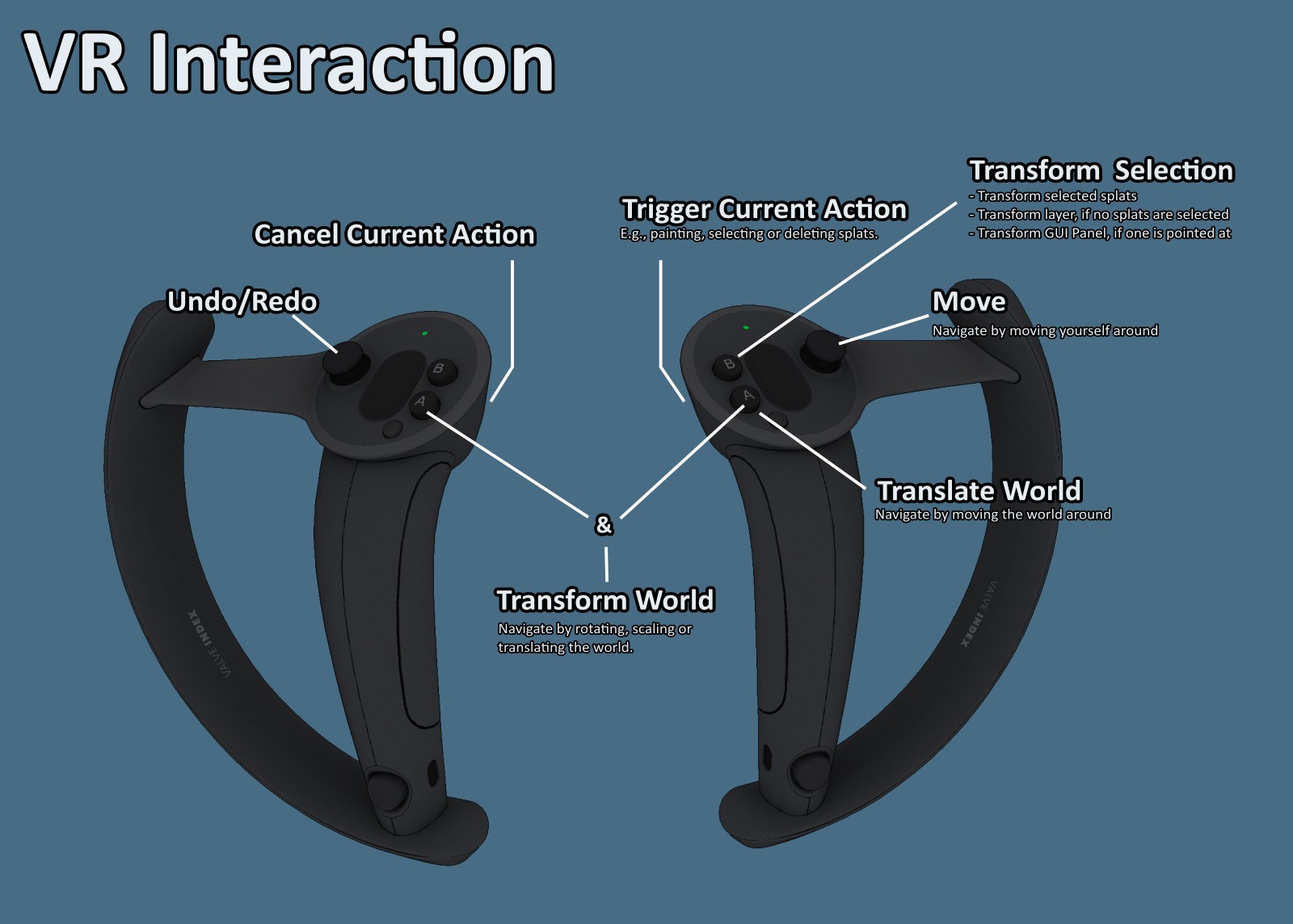
The tool includes built-in painting functionality and features like perspective correct Gaussian rendering, provided the splat models were trained with the appropriate methods. There’s also native CUDA integration, allowing users to hot reload CUDA code much like shaders. Notably, Splatshop does not depend on Python, pip, or conda, making it refreshingly straightforward for developers accustomed to C++ and CUDA-based workflows.

As you might expect from an academic prototype, there are limitations. Undo and redo functionality is implemented, but not yet exhaustive. Transform operations like scaling can suffer from lossy precision, especially when models are scaled down too far. Startup times can be a bit long, since CUDA code compiles on launch, and Linux users may run into additional setup requirements such as ensuring compatibility with specific versions of GCC, CUDA, and TBB.

Despite these early caveats, the development team has released Splatshop now in order to gather feedback and prioritize future features and fixes.

The workflow, while currently relying on hardcoded shortcuts and CMake-based builds, is impressively usable. Users can drag and drop .ply files into the interface, perform local edits, clean up noise using selection tools, and organize parts of their scenes into reusable assets. One example use case: selecting a patch of reconstructed grass, duplicating it, and layering it into another part of the scene to patch a hole or missing region. Layered editing, combined with real-time feedback, makes this kind of scene repair more accessible than ever for Gaussian Splatting pipelines.

There’s also support for creating asset libraries. Once a layer is defined, it can be named and converted into a reusable asset, forming the basis for more complex scene compositions. For developers interested in extending the editor, Splatshop provides hooks for adding custom toolbar actions, interface widgets, and ImGui-based settings panels, encouraging further experimentation and feature development.

Splatshop draws inspiration from other open-source efforts, including SuperSplat and the WebGL renderer from Mark Kellogg, while incorporating key tools like GPUSorting for efficient splat management.

For those eager to try it, the GitHub repository offers a sample dataset and precompiled Windows binary, with the caveat that CUDA 12.4 or later is required. A visual studio build setup is provided for Windows users, while Linux users will need to follow a slightly more manual process involving setting environment variables and dependencies.

Even in this early stage, Splatshop stands out. It fills a critical gap in the radiance field landscape: the need for editable, artist-friendly tooling. As real-time radiance fields continue to grow in popularity, tools like this one will become increasingly important.

You can find the full source code, example models, and installation instructions on GitHub.

Featured

Recents

Platforms

LichtFeld Studio 0.5.4 Adds a .licht Project Format, Normal-Guided Training, and Gallery Publishing

LichtFeld Studio 0.5.4 adds a .licht project format, normal-guided training, lower training VRAM, and direct publishing to the Gallery from inside the app.

Michael Rubloff

Oct 8, 2026

Platforms

LichtFeld Studio 0.5.4 Adds a .licht Project Format, Normal-Guided Training, and Gallery Publishing

LichtFeld Studio 0.5.4 adds a .licht project format, normal-guided training, lower training VRAM, and direct publishing to the Gallery from inside the app.

Michael Rubloff

Platforms

EMX Brings Rain, Snow and Wind to Gaussian Splat Scenes in ANNX AI Editor v1.8.0

ANNX AI Editor v1.8.0 adds rain, snow, and wind to Gaussian splat scenes in the browser, with wind regions that sway selected splats in image and video exports.

Michael Rubloff

Oct 8, 2026

Platforms

EMX Brings Rain, Snow and Wind to Gaussian Splat Scenes in ANNX AI Editor v1.8.0

ANNX AI Editor v1.8.0 adds rain, snow, and wind to Gaussian splat scenes in the browser, with wind regions that sway selected splats in image and video exports.

Michael Rubloff

News

Daniel Skaale Shows Omnia Splat Builder Turning One Still Into a 360 Degree Gaussian Splat

Daniel Skaale demos Omnia Splat Builder, which turns one still image into a 360-degree Gaussian splat through an AI-generated orbit and automated cleanup.

Michael Rubloff

Oct 8, 2026

News

Daniel Skaale Shows Omnia Splat Builder Turning One Still Into a 360 Degree Gaussian Splat

Daniel Skaale demos Omnia Splat Builder, which turns one still image into a 360-degree Gaussian splat through an AI-generated orbit and automated cleanup.

Michael Rubloff

News

Japan's Infrastructure Ministry Registers a 3D Gaussian Splatting Method in NETIS

Japan's MLIT registers a 3D Gaussian Splatting method from Tohoku University and XMAT in NETIS, building bridge and tunnel models from 360-degree camera images.

Michael Rubloff

Oct 7, 2026

News

Japan's Infrastructure Ministry Registers a 3D Gaussian Splatting Method in NETIS

Japan's MLIT registers a 3D Gaussian Splatting method from Tohoku University and XMAT in NETIS, building bridge and tunnel models from 360-degree camera images.

Michael Rubloff

Trending Articles
  1. TRENDING
    Loading...
  2. TRENDING
    Loading...
  3. TRENDING
    Loading...
Michael Rubloff

Written by Michael Rubloff

Michael is the Founder and Managing Editor of Radiancefields.com

More from Michael Rubloff

More from Michael Rubloff

Platforms

LichtFeld Studio 0.5.4 Adds a .licht Project Format, Normal-Guided Training, and Gallery Publishing

LichtFeld Studio 0.5.4 adds a .licht project format, normal-guided training, lower training VRAM, and direct publishing to the Gallery from inside the app.

Michael Rubloff

Oct 8, 2026

Lichtfeld Studio

Platforms

LichtFeld Studio 0.5.4 Adds a .licht Project Format, Normal-Guided Training, and Gallery Publishing

Michael Rubloff

Oct 8, 2026

Lichtfeld Studio

Platforms

LichtFeld Studio 0.5.4 Adds a .licht Project Format, Normal-Guided Training, and Gallery Publishing

LichtFeld Studio 0.5.4 adds a .licht project format, normal-guided training, lower training VRAM, and direct publishing to the Gallery from inside the app.

Michael Rubloff

Oct 8, 2026

Lichtfeld Studio

Platforms

EMX Brings Rain, Snow and Wind to Gaussian Splat Scenes in ANNX AI Editor v1.8.0

ANNX AI Editor v1.8.0 adds rain, snow, and wind to Gaussian splat scenes in the browser, with wind regions that sway selected splats in image and video exports.

Michael Rubloff

Oct 8, 2026

ANNX AI Editor

Platforms

EMX Brings Rain, Snow and Wind to Gaussian Splat Scenes in ANNX AI Editor v1.8.0

Michael Rubloff

Oct 8, 2026

ANNX AI Editor

Platforms

EMX Brings Rain, Snow and Wind to Gaussian Splat Scenes in ANNX AI Editor v1.8.0

ANNX AI Editor v1.8.0 adds rain, snow, and wind to Gaussian splat scenes in the browser, with wind regions that sway selected splats in image and video exports.

Michael Rubloff

Oct 8, 2026

ANNX AI Editor

News

Daniel Skaale Shows Omnia Splat Builder Turning One Still Into a 360 Degree Gaussian Splat

Daniel Skaale demos Omnia Splat Builder, which turns one still image into a 360-degree Gaussian splat through an AI-generated orbit and automated cleanup.

Michael Rubloff

Oct 8, 2026

Omnia Builder

News

Daniel Skaale Shows Omnia Splat Builder Turning One Still Into a 360 Degree Gaussian Splat

Michael Rubloff

Oct 8, 2026

Omnia Builder

News

Daniel Skaale Shows Omnia Splat Builder Turning One Still Into a 360 Degree Gaussian Splat

Daniel Skaale demos Omnia Splat Builder, which turns one still image into a 360-degree Gaussian splat through an AI-generated orbit and automated cleanup.

Michael Rubloff

Oct 8, 2026

Omnia Builder

New to Gaussian Splatting? Start here

Radiance fields, explained from the ground up: what a Gaussian splat is, how to capture one, and which tools and gear to start with.

Newsletter

Keep up with the field.

New research, tools and captures from the Radiance Fields newsroom, in your inbox. Free, no spam.