
There has been a surge in interest in VR based radiance field methods since the release of the Apple Vision Pro. I admittedly spent significantly more time in VR than I had alotted myself, contributing to this article being published a few days after its release.
In a nutshell, VR-GS expands the work done with PhysGaussian last year and extends it into the world of virtual reality. Yes that means that you can interact with your captures in a physically accurate way.
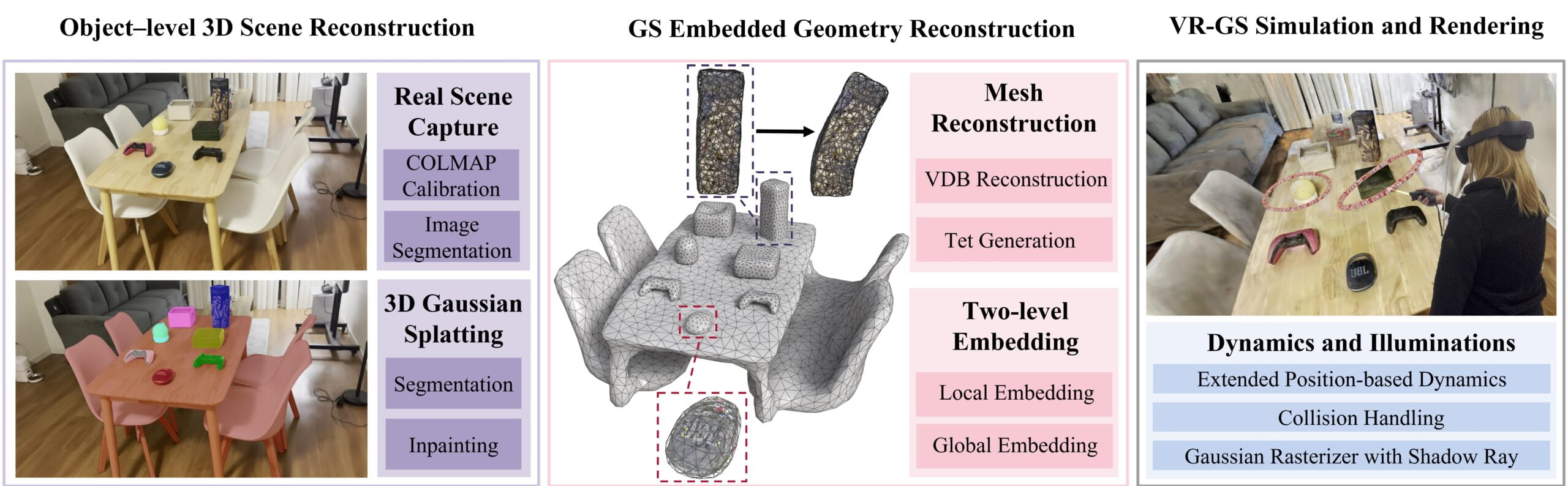
The authors took great care to ensure that VR-GS is immersive, real-time, has a user-friendly VR system, and has a unified framework. That last part is interesting to me, because they handle both the rendering and the physics simulation in the same pipeline. It goes back to the concept of what you see is what you simulate. That phrase has appeared consistently through their work. VR-GS also extends real world physics to produce lifelike interactions and manipulations of a scene, as opposed to using generative AI. VR-GS additionally introduces sophisticated segmentation and inpainting techniques, crucial for enhancing the system’s immersive and user-friendly VR experience.
We’ve seen a few platforms and methods emerge for virtual reality based radiance fields, but this one has as slight distinction. Other methods, such as VR-NeRF, Magic NeRF Lens, and most recently MetalSplatter focus on the representation of the scene. What’s really interesting about VR-GS is that it asks the question about how can people interact with the scene itself.
The core innovation of the VR-GS (Virtual Reality-Gaussian Splatting) system lies in its groundbreaking approach to interactive 3D content manipulation and rendering within virtual reality environments. This innovation is centered around the integration of Gaussian Splatting (GS) with physics-aware dynamics to facilitate real-time interaction with deformable virtual entities and intricately detailed environments. Let’s delve into the specifics of this innovation and its implications for the future of VR technology.
As the name implies, at the heart of VR-GS is 3D Gaussian Splatting, which takes a series of 2D images to create lifelike three dimensional representations of what it sees.
The integration of eXtended Position-based Dynamics (XPBD) with GS kernels introduces a layer of real-time physics-based simulation that is adaptable and highly efficient. XPBD, a cutting-edge physical simulator, allows for the simulation of deformable bodies with realistic dynamic responses. This combination ensures that interactions within the VR environment not only look visually compelling but also behave in accordance with physical laws, enhancing the realism of the virtual experience.
Another key aspect of VR-GS’s innovation is its two-level embedding strategy, designed to handle the deformation of GS kernels. This strategy involves constructing a tetrahedral cage for each segmented GS kernel group and embedding these groups into corresponding meshes. The deformation of these meshes, driven by XPBD, guides the deformation of the GS kernels, ensuring smooth and realistic movements. This approach effectively resolves potential artifacts that could arise from simpler embedding techniques, allowing for high-quality, dynamic rendering of complex scenes. It is also what empowers the real time editing and manipulation. Interestingly, splatfacto from nerfstudio flagged this same exact issue, which was taken from PhysGaussian (same author)!
Another standout feature is VR-GS’s segmentation capability. Segmentation meticulously identifies and isolates various objects within a 3D scene, allowing users to interact with and manipulate individual elements with unparalleled precision. This process is vital for creating a truly interactive VR experience where every object behaves as it would in the real world, adhering to the laws of physics.
However, interaction often leads to the manipulation of objects, potentially exposing areas that were occluded or not captured in the original dataset. This is where inpainting comes into play. VR-GS leverages advanced inpainting techniques to dynamically fill in these gaps, ensuring that the visual integrity of the scene remains intact even as objects are moved or removed. Inpainting is essential for maintaining the continuity of the virtual environment, allowing for seamless edits that contribute to the overall realism of the experience.
Some cool, small details is that they go as far to include dynamic shadow casting and real time deformation embedding. Shadow maps are employed to add dynamic shadows to a 3D scene, enhancing the visual realism and spatial awareness crucial for immersive virtual reality experiences.
The process begins with the generation of a depth map from the perspective of the light source. This map records the closest distance from the light to the surfaces in the scene, effectively capturing which parts of the scene are directly illuminated and which are occluded. When rendering the scene from the user’s viewpoint, the system compares the depth of each point in the scene (as seen from the light source) against the stored depth map. Points that match or are closer than the depth map are considered lit, while those further away are in shadow. As objects move or the light source changes position, the VR-GS system dynamically updates the depth map and recalculates the shadows. This ensures that shadows accurately reflect the current state of the environment, contributing to a realistic and responsive VR experience.
The unique challenge in VR-GS comes from integrating shadow maps with Gaussian Splatting. Given GS’s explicit representation of objects using Gaussian kernels, the system must adeptly handle the calculation of shadows cast by and onto these kernels. This is achieved through careful adaptation of the shadow mapping technique, ensuring that the splatted objects not only render with high fidelity but also cast and receive shadows realistically. All of this, so that we can feel more immersed!
On top of that VR-GS is fast. Like really fast.
You might also be wondering what’s powering this? Is it a 20 GPU workstation like in VR-NeRF? Not exactly. It’s actually being powered within Unity on a 4090 and a Quest Pro. From parts of their experiments they created a scene where the objective is to pet a fox and this quote stood out to me.
“I love this a lot. I have a dog. Petting the fox is really like what I did to my dog at home. I(t) felt so real. VR-GS: A Physical Dynamics-Aware Interactive Gaussian Splatting System in Virtual RealityTweet
Imagine a world where there are infinite lifelike animals to pet!
There’s so much left to conquer in the world of radiance fields and VR, but I always get excited when I see methods and work like this which are charging head on into the fray of exploration. There’s been no word yet on whether or not VR-GS will release and when, but given the length that the authors discuss design choices in the paper, I believe we will hopefully get access to it soon.


