
GigaSplat Editor, Fork of SuperSplat for Experimental Features

Built on top of PlayCanvas's SuperSplat, GigaSplat brings more experimental features.

Built on top of PlayCanvas's SuperSplat, GigaSplat brings more experimental features.

Michael Rubloff

Michael Rubloff

Michael is the Founder and Managing Editor of Radiancefields.com

GigaSplat

In the fast moving world of Gaussian Splatting tools, SuperSplat has become the de facto standard for editing captures. But because it is open sourced and permissibly licensed, developers can extend it separately.

That is the origin of GigaSplat, a new experimental platform built on top of SuperSplat and released this month by its creator as a “laboratory for Gaussian editing.” Rather than competing with SuperSplat, the project positions itself as an idea engine, a space where new interactions, UX refinements, and creative utilities can be tested rapidly, with the explicit hope that PlayCanvas (which maintains SuperSplat) will fold successful features back into the core editor.

The developer has already shared the full codebase with PlayCanvas. GigaSplat is openly designed as a contribution to the broader tooling ecosystem, to be a sandbox where new ideas can be tried without the weight of full production integration.

The inaugural release introduces a broad set of utilities aimed squarely at real world cleanup, inspection, and comparison.

One of the most immediately useful tools is Isolated Splats Analysis, a system that detects floaters and other stray points with tuned parameters and real time feedback. GigaSplat also adds a Camera Presets system supporting up to ten saved viewpoints.

Model heavy pipelines gain a lift from Quick Model Switching and a “show only selected file” mode, while multi model alignment gets a dedicated Alignment Tool that uses shared control points for precise registration. A new Compare Feature lets users reference one model to locate and remove unwanted splats in another.

Selection workflows see a complete overhaul. A new Circle Select Tool creates a much smoother, more intuitive region selection experience, and a Move While Selecting modifier (Ctrl + Shift) allows users to reposition the model without breaking their active selection. Common quality of life shortcuts, Unselect All, Invert Selection, round out the set, while the File menu now includes Recent Projects and Recent Imports, bringing SuperSplat style fluidity to reopening scenes.

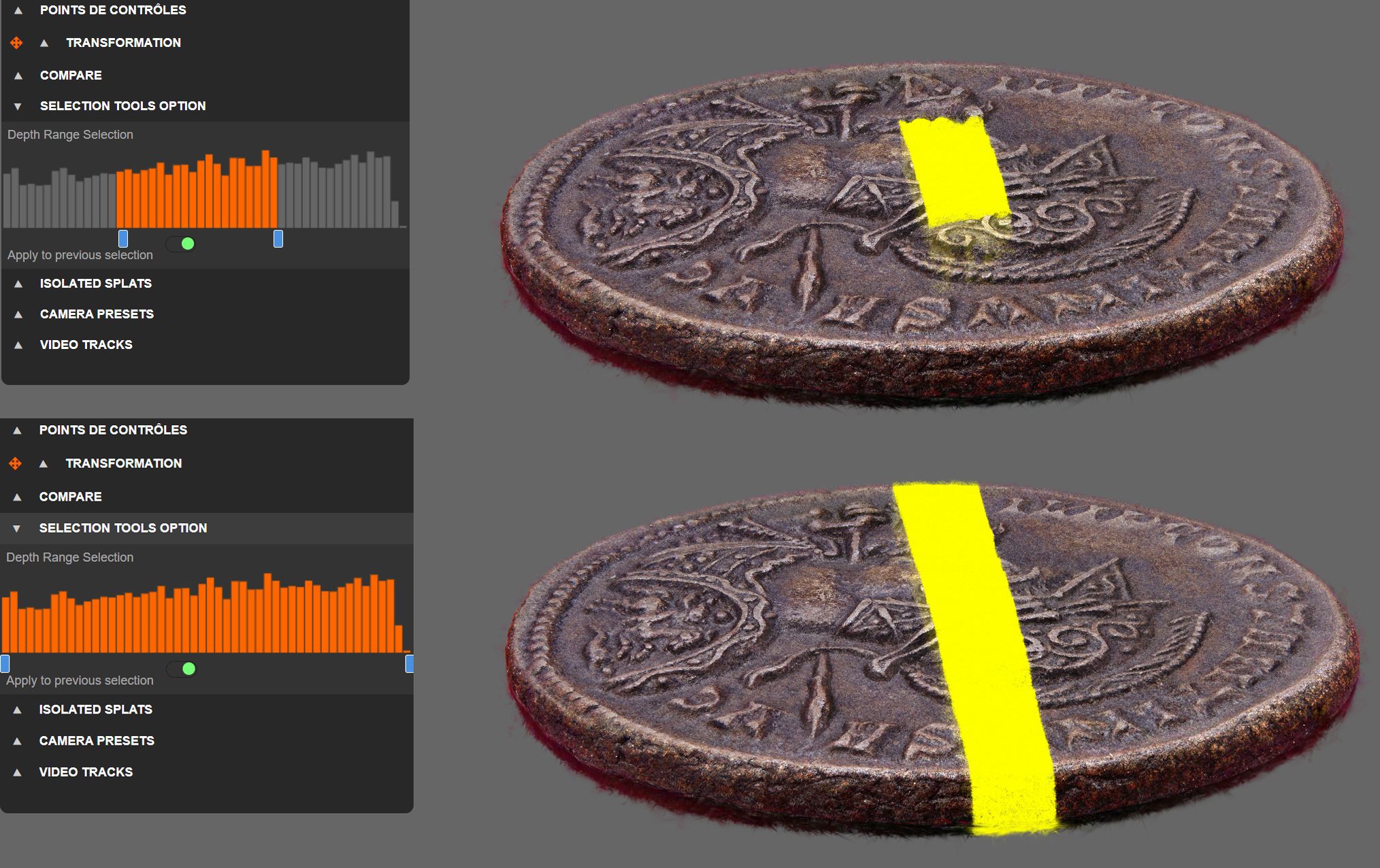
Then just a day later, GigaSplat pushed an even bigger update: Depth-Filtered Selection, which exposes the depth structure of the selection area. This makes it much easier to create local adjustments in the editor. Behind the interface, GigaSplat caches the full list of “candidate splats” within the 2D area, enabling instant refinement without rerunning the selection every time.

A new Selection Tools Options panel appears whenever users select splats, offering a Depth Histogram that visualizes how splats distribute along the z-axis, paired with dual range sliders for filtering by percentage or actual world space units. Users can choose between Live Filtering, which dynamically adjusts existing selections, or Static Filtering for future selections only.

GigaSplat’s creator emphasizes that the project isn’t a fork meant to compete; it’s intentionally porous, openly inviting PlayCanvas to integrate any useful pieces back into Supersplat. As GigaSplat continues releasing experimental features, it appears to be a fast moving R&D layer atop the most established editor in Gaussian Splatting today.

The developer is actively seeking feedback, feature ideas, and real world test cases as the platform evolves. You can try GigaSplat for free.

Featured

Recents

News

Eclipse Automation Opens RealitySync on iPhone, iPad, and Apple Vision Pro

Eclipse RealitySync opens as a free public preview on iPhone, iPad, and Apple Vision Pro with a customer pilot, and Eclipse says it uses Gaussian splatting.

Michael Rubloff

Oct 17, 2026

News

Eclipse Automation Opens RealitySync on iPhone, iPad, and Apple Vision Pro

Eclipse RealitySync opens as a free public preview on iPhone, iPad, and Apple Vision Pro with a customer pilot, and Eclipse says it uses Gaussian splatting.

Michael Rubloff

Platforms

Voxel51 Launches 3.0 for Physical AI

Voxel51 3.0 relaunches the platform for physical AI, and the open source FiftyOne 3D viewer beneath it has rendered Gaussian splats via Spark since 1.21.0.

Michael Rubloff

Oct 17, 2026

Platforms

Voxel51 Launches 3.0 for Physical AI

Voxel51 3.0 relaunches the platform for physical AI, and the open source FiftyOne 3D viewer beneath it has rendered Gaussian splats via Spark since 1.21.0.

Michael Rubloff

Platforms

Warpgate Labs Improves RSR VR Compatibility With Virtual Desktop and SteamVR in v0.9.1

RSR v0.9.1 requests OpenXR 1.0 instead of 1.1 to improve VR compatibility with Virtual Desktop and SteamVR, and adds multi-GPU headset routing.

Michael Rubloff

Oct 17, 2026

Platforms

Warpgate Labs Improves RSR VR Compatibility With Virtual Desktop and SteamVR in v0.9.1

RSR v0.9.1 requests OpenXR 1.0 instead of 1.1 to improve VR compatibility with Virtual Desktop and SteamVR, and adds multi-GPU headset routing.

Michael Rubloff

News

Clemson University Turns Existing Drone Imagery of Memorial Stadium Into a Gaussian Splat With Esri Drone2Map

Clemson University reprocessed existing drone imagery of Memorial Stadium into a Gaussian splat and a mesh in Esri ArcGIS Drone2Map in about 13 hours total.

Michael Rubloff

Oct 17, 2026

News

Clemson University Turns Existing Drone Imagery of Memorial Stadium Into a Gaussian Splat With Esri Drone2Map

Clemson University reprocessed existing drone imagery of Memorial Stadium into a Gaussian splat and a mesh in Esri ArcGIS Drone2Map in about 13 hours total.

Michael Rubloff

Trending Articles
  1. TRENDING
    Loading...
  2. TRENDING
    Loading...
  3. TRENDING
    Loading...
Michael Rubloff

Written by Michael Rubloff

Michael is the Founder and Managing Editor of Radiancefields.com

More from Michael Rubloff

More from Michael Rubloff

News

Eclipse Automation Opens RealitySync on iPhone, iPad, and Apple Vision Pro

Eclipse RealitySync opens as a free public preview on iPhone, iPad, and Apple Vision Pro with a customer pilot, and Eclipse says it uses Gaussian splatting.

Michael Rubloff

Oct 17, 2026

Eclipse RealitySync

News

Eclipse Automation Opens RealitySync on iPhone, iPad, and Apple Vision Pro

Michael Rubloff

Oct 17, 2026

Eclipse RealitySync

News

Eclipse Automation Opens RealitySync on iPhone, iPad, and Apple Vision Pro

Eclipse RealitySync opens as a free public preview on iPhone, iPad, and Apple Vision Pro with a customer pilot, and Eclipse says it uses Gaussian splatting.

Michael Rubloff

Oct 17, 2026

Eclipse RealitySync

Platforms

Voxel51 Launches 3.0 for Physical AI

Voxel51 3.0 relaunches the platform for physical AI, and the open source FiftyOne 3D viewer beneath it has rendered Gaussian splats via Spark since 1.21.0.

Michael Rubloff

Oct 17, 2026

Voxel51

Platforms

Voxel51 Launches 3.0 for Physical AI

Michael Rubloff

Oct 17, 2026

Voxel51

Platforms

Voxel51 Launches 3.0 for Physical AI

Voxel51 3.0 relaunches the platform for physical AI, and the open source FiftyOne 3D viewer beneath it has rendered Gaussian splats via Spark since 1.21.0.

Michael Rubloff

Oct 17, 2026

Voxel51

Platforms

Warpgate Labs Improves RSR VR Compatibility With Virtual Desktop and SteamVR in v0.9.1

RSR v0.9.1 requests OpenXR 1.0 instead of 1.1 to improve VR compatibility with Virtual Desktop and SteamVR, and adds multi-GPU headset routing.

Michael Rubloff

Oct 17, 2026

Rapid Splat Renderer

Platforms

Warpgate Labs Improves RSR VR Compatibility With Virtual Desktop and SteamVR in v0.9.1

Michael Rubloff

Oct 17, 2026

Rapid Splat Renderer

Platforms

Warpgate Labs Improves RSR VR Compatibility With Virtual Desktop and SteamVR in v0.9.1

RSR v0.9.1 requests OpenXR 1.0 instead of 1.1 to improve VR compatibility with Virtual Desktop and SteamVR, and adds multi-GPU headset routing.

Michael Rubloff

Oct 17, 2026

Rapid Splat Renderer

New to Gaussian Splatting? Start here

Radiance fields, explained from the ground up: what a Gaussian splat is, how to capture one, and which tools and gear to start with.

Newsletter

Keep up with the field.

New research, tools and captures from the Radiance Fields newsroom, in your inbox. Free, no spam.