ANNX Studio: Gaussian Splatting on Mac

ANNX Studio: Gaussian Splatting on Mac

ANNX Studio: Gaussian Splatting on Mac

Michael Rubloff

Michael Rubloff

May 27, 2025

Email
Copy Link
Twitter
Linkedin
Reddit
Whatsapp
ANNX Studio
ANNX Studio

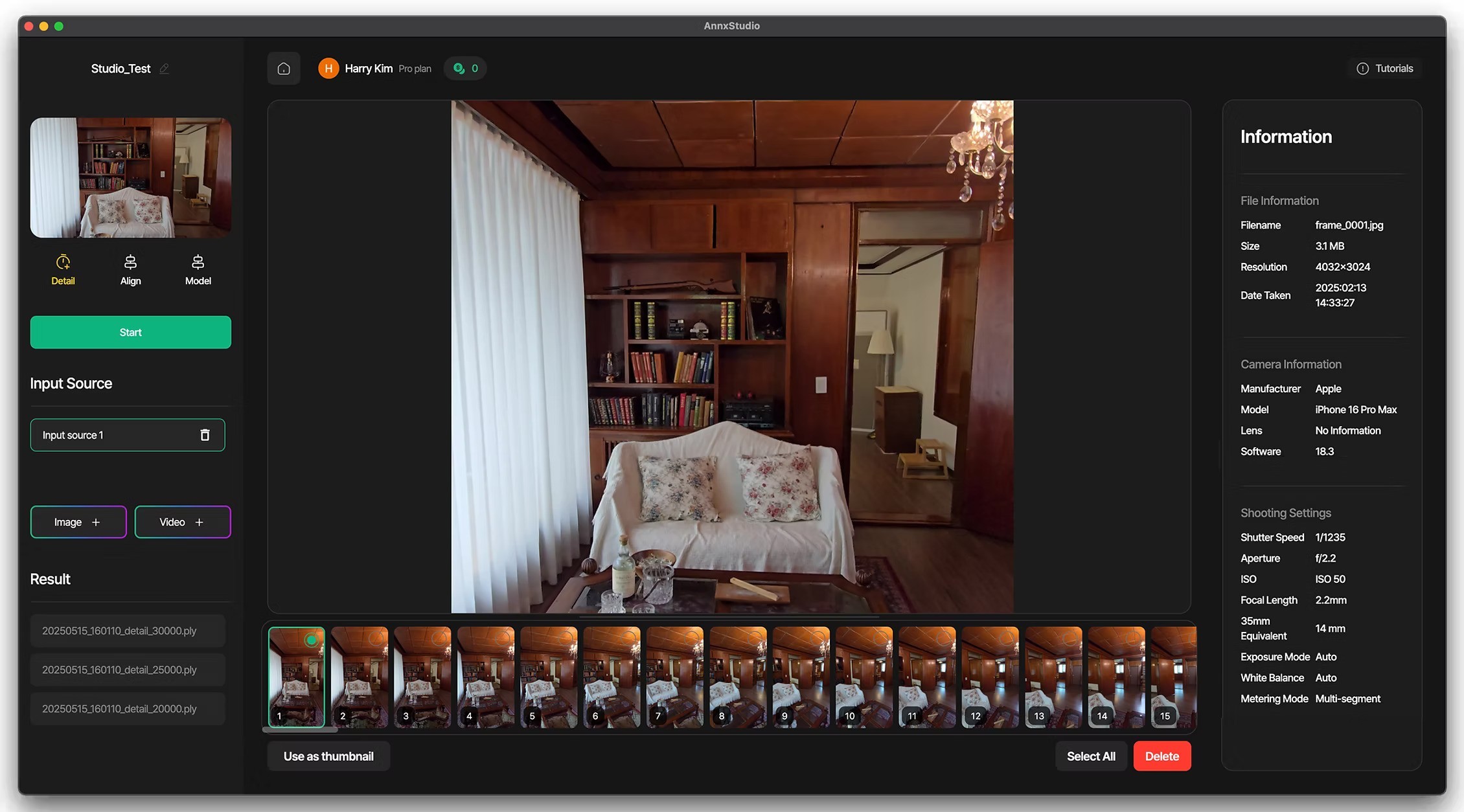
A new player has entered the radiance field ecosystem and Mac users should rejoice. ANNX Studio is a powerful, user-friendly platform for Gaussian Splatting workflows, offering cross-platform support and integrated tooling that sets it apart from many of today’s offerings.

One of ANNX Studio’s headline features is its accessibility. Unlike many Gaussian Splatting pipelines that rely on GPU-heavy Windows or Linux setups, ANNX Studio supports training and viewing directly on macOS, in addition to Windows and the web.

It’s incredibly simple to install, with a single download button. For fans of Arthur Brussee’s Brush, ANNX Studio will feel familiar—Brush powers the core of the platform. What makes ANNX Studio particularly compelling, beyond its fully fleshed-out GUI, is its inclusion of Structure from Motion (SfM) capabilities.

While Brush can process already aligned captures, users typically need to run COLMAP or RealityCapture beforehand to generate camera poses. ANNX Studio removes that friction: you can drop in your images or video, and it handles SfM internally. You even get togglable options for feature matching and extraction, offering more control over the reconstruction process.

Once your capture has finished training, you can seamlessly move into post-processing. ANNX Studio comes with the open source 3DGS editor SuperSplat fully integrated, making it easy to crop floaters, resize splats, or fine-tune the result, all within the same platform.

The platform uses a credit-based pricing system, with both free and paid tiers. Paid options include features like exporting trained .ply files.

For Mac users looking to harness Brush’s capabilities without needing to manually align cameras, ANNX Studio is a big step forward. Brush still remains free and open-source for those who prefer to stay hands-on, but ANNX Studio wraps the full pipeline in a far more approachable package. ANNX Studio can be downloaded here.

Featured

Recents

Featured

A$AP Rocky Releases Helicopter Music Video featuring Gaussian Splatting

This is actually not the first time A$AP has used Radiance Fields in a music video.

Michael Rubloff

Jan 13, 2026

A$AP Rocky Releases Helicopter Music Video featuring Gaussian Splatting

This is actually not the first time A$AP has used Radiance Fields in a music video.

Michael Rubloff

Jan 13, 2026

A$AP Rocky Releases Helicopter Music Video featuring Gaussian Splatting

This is actually not the first time A$AP has used Radiance Fields in a music video.

Michael Rubloff

Platforms

PlayCanvas Releases Engine Version 2.15

Several updates to the PlayCanvas Engine have arrived.

Michael Rubloff

Jan 12, 2026

Platforms

PlayCanvas Releases Engine Version 2.15

Several updates to the PlayCanvas Engine have arrived.

Michael Rubloff

Jan 12, 2026

Platforms

PlayCanvas Releases Engine Version 2.15

Several updates to the PlayCanvas Engine have arrived.

Michael Rubloff

Platforms

Bitbybit adds 3DGS Shadows and PlayCanvas Support

Bitbybit has added gaussian splatting shadow support

Michael Rubloff

Jan 12, 2026

Platforms

Bitbybit adds 3DGS Shadows and PlayCanvas Support

Bitbybit has added gaussian splatting shadow support

Michael Rubloff

Jan 12, 2026

Platforms

Bitbybit adds 3DGS Shadows and PlayCanvas Support

Bitbybit has added gaussian splatting shadow support

Michael Rubloff

Platforms

World Labs Releases Marble Update

World Labs added some capabilities to Marble and a new tutorial.

Michael Rubloff

Jan 10, 2026

Platforms

World Labs Releases Marble Update

World Labs added some capabilities to Marble and a new tutorial.

Michael Rubloff

Jan 10, 2026

Platforms

World Labs Releases Marble Update

World Labs added some capabilities to Marble and a new tutorial.

Michael Rubloff