
Pop Goes the 3DGS Flicker: Stop the Pop

If you've interacted with Gaussian Splatting, you might have noticed an issue described as "popping," where details appear to flicker as you move through a scene.

If you've interacted with Gaussian Splatting, you might have noticed an issue described as "popping," where details appear to flicker as you move through a scene.

Michael Rubloff

Michael Rubloff

Michael is the Founder and Managing Editor of Radiancefields.com

Stop the Pop

If you’ve interacted with Gaussian Splatting, you might have noticed an issue described as “popping,” where details appear to flicker as you move through a scene. This can be quite annoying, and a new method called Stop the Pop promises to eliminate this flickering and enhance visual fidelity.

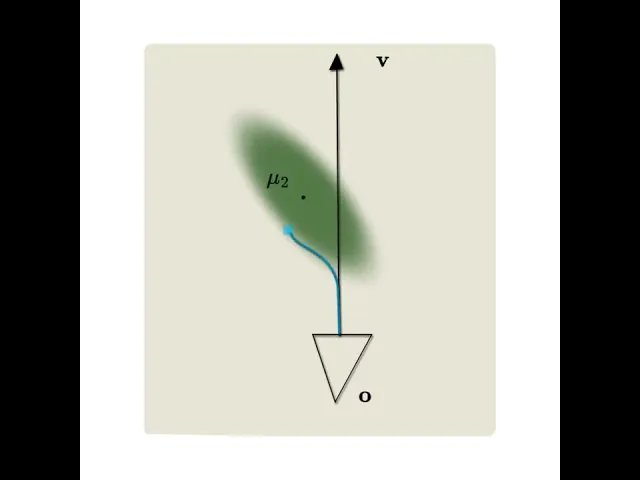
The Stop the Pop method begins with the calculation of an optimal depth value for each Gaussian along every view ray. This depth is determined as the point of maximum contribution of the Gaussian along the ray, ensuring that the most significant elements are rendered first, thereby minimizing visual inconsistencies.
To efficiently manage the vast number of Gaussians typically involved in rendering complex scenes, Stop the Pop employs a hierarchical sorting and culling strategy. This approach divides the rendering process into multiple levels, each handling progressively finer details.

The first level involves dividing the image into tiles, typically 16x16 pixels in size, similar to how 3DGS functions. For each tile, the method evaluates the maximum within the tile (in 2D) and then reconstructs the corresponding ray (from the camera to this specific point on the image plane) - subsequently, we compute the depth for this ray. This significantly reduces the number of Gaussians that need to be considered at finer levels.
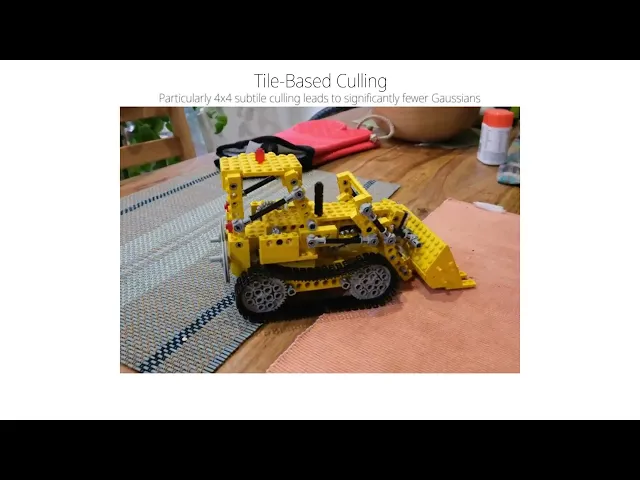
During this culling process, the bounding rectangle for each Gaussian is examined by evaluating its 2D projection onto the image plane. This projection uses the largest eigenvalue of the 2D covariance matrix to establish a conservative bound. Gaussians that do not intersect with the tile are discarded.

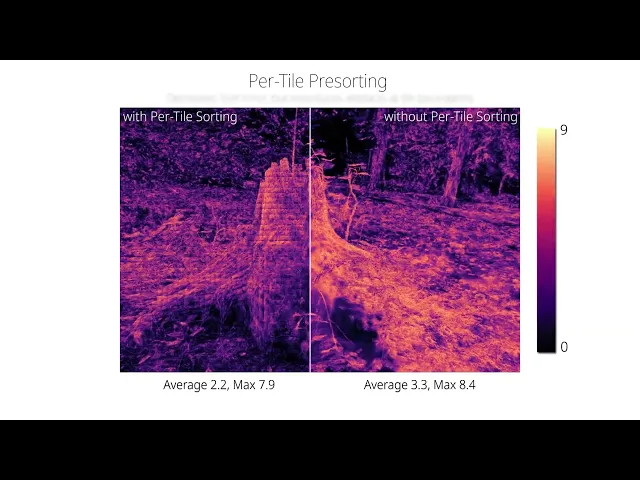
Once the relevant Gaussians for each tile are identified, a representative depth value for each Gaussian is calculated within the tile. This depth is used to sort the Gaussians, ensuring that those closer to the camera are rendered first. 

Because they have the maximum within the tile and know that Gaussians with alpha < 1/255.f are not considered during rendering, they can compute the maximum alpha value within the tile and discard Gaussians under the threshold, which increases performance.

For 4x4 subtiles, they repeat the exact same procedure (compute the maximum in 2D, reconstruct the ray, compute depth, culling) - this drastically reduces the number of Gaussians to consider as a large number of Gaussians only cover a single pixel.

After the initial sorting at the tile level, the sort order is further refined by performing local resorting within smaller sub-tiles (e.g., 2x2 pixels). They take the center ray of the tile, as computing the maximum is costly, and can’t amortize it with culling for such small tiles.

This step ensures that the depth order is accurate down to the individual pixel level, effectively eliminating popping artifacts.
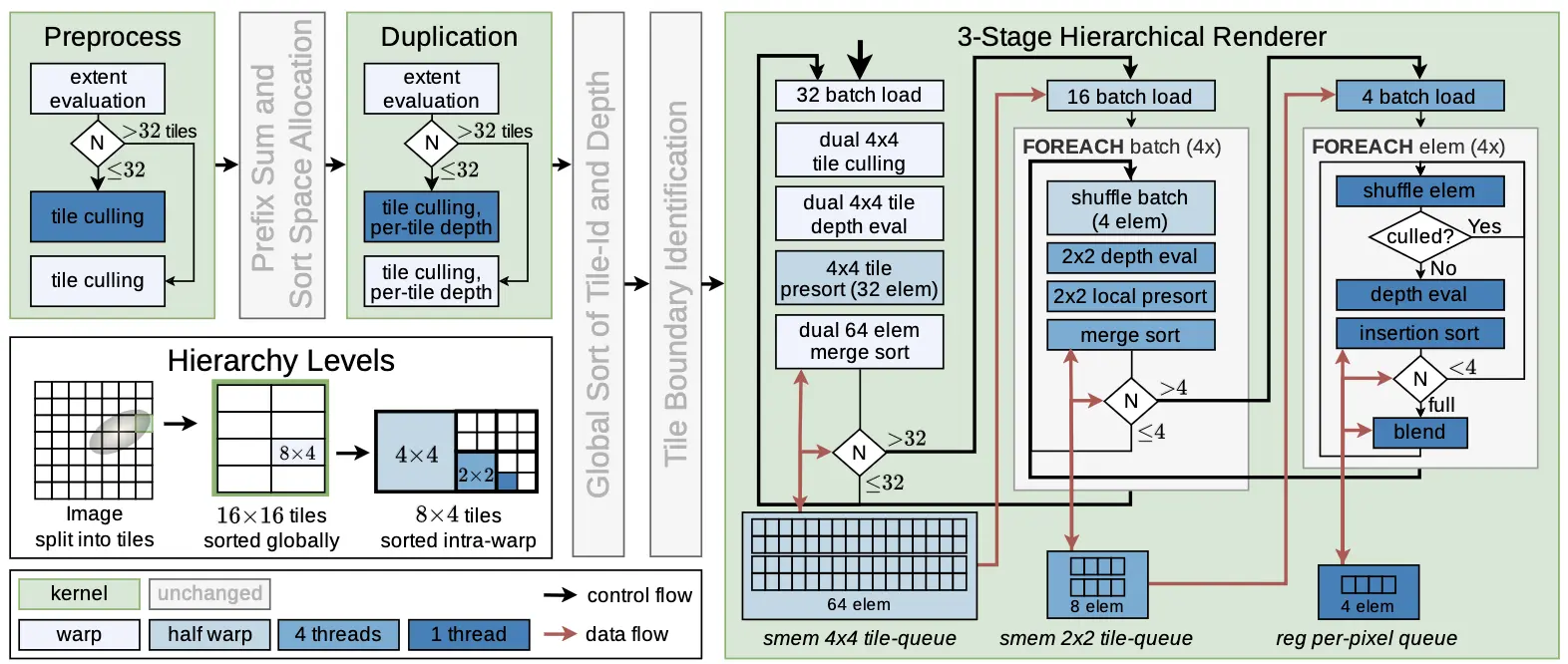
The hierarchical approach necessitates an optimized rendering pipeline that balances computational efficiency with high accuracy. To handle the variable workload associated with different Gaussians, a load balancing scheme is used. Gaussians that cover a large portion of the screen are processed cooperatively by multiple threads, distributing the computational load and minimizing bottlenecks.

Memory access patterns are also optimized to maximize performance, ensuring that data is efficiently loaded and shared among threads. This involves preloading commonly used values and using shared memory to minimize global memory accesses.

StopThePop requires a change to the backward pass to bypass the requirement of storing per-ray sorted Gaussians: This is achieved by performing the backward pass equivalently to the forward pass, and computing gradients in addition to blending.

To quantify the results, the developers uses FLIP from NVIDIA. Despite all the updates made to 3DGS, Stop the Pop only results in a 4% increase in render times. This slight tradeoff is worthwhile for the increased visual fidelity. Additionally, Stop the Pop works well on consumer-grade GPUs, with tests completed on an NVIDIA RTX 4090.

Stop the Pop’s code is available on GitHub, and while the original Gaussian Splatting license remains for the 3DGS portion, Stop the Pop’s code is MIT Licensed, making it permissibly licensed for people to expand upon. Additionally, they’ve also provided a real time viewer through SIBR, just like traditional 3DGS. The team behind Stop the Pop will also be giving a talk at SIGGRAPH in a couple of months.

With the recent release of Gracia’s VR 1.0, it would be exciting to see Stop the Pop implemented into the pipeline, making captures look even more lifelike! Hopefully we will start to see the method be adapted into other platforms, such as Nerfstudio’s Splatfacto and Polycam. 

Featured

Recents

Platforms

Viggle Launches JST 2, a World Model That Builds 3D Characters and Scenes From Gaussian Splats

Viggle JST 2 builds 3D characters, motion and scenes from persistent Gaussian splats, viewable from any angle, and runs in PINOC with Agent Mode and MCP access.

Michael Rubloff

Oct 19, 2026

Platforms

Viggle Launches JST 2, a World Model That Builds 3D Characters and Scenes From Gaussian Splats

Viggle JST 2 builds 3D characters, motion and scenes from persistent Gaussian splats, viewable from any angle, and runs in PINOC with Agent Mode and MCP access.

Michael Rubloff

Platforms

LichtFeld Studio v0.5.4.1 Drags Splats Into Blender and Trains Inside a Live Crop Box

LichtFeld Studio v0.5.4.1 drags Gaussian splats into folders or Blender as PLY or SPZ, trains a live crop box with fewer floaters, and trains from meshes.

Michael Rubloff

Oct 19, 2026

Platforms

LichtFeld Studio v0.5.4.1 Drags Splats Into Blender and Trains Inside a Live Crop Box

LichtFeld Studio v0.5.4.1 drags Gaussian splats into folders or Blender as PLY or SPZ, trains a live crop box with fewer floaters, and trains from meshes.

Michael Rubloff

Platforms

Room Scan Exporter v0.3 Turns Meta Quest 3 Room Scans Into Gaussian Splats

Room Scan Exporter v0.3 for Meta Quest 3 and 3S trains Gaussian splats on a Windows PC and streams them back to the headset at life size or as a tabletop model.

Michael Rubloff

Oct 18, 2026

Platforms

Room Scan Exporter v0.3 Turns Meta Quest 3 Room Scans Into Gaussian Splats

Room Scan Exporter v0.3 for Meta Quest 3 and 3S trains Gaussian splats on a Windows PC and streams them back to the headset at life size or as a tabletop model.

Michael Rubloff

News

Eclipse Automation Opens RealitySync on iPhone, iPad, and Apple Vision Pro

Eclipse RealitySync opens as a free public preview on iPhone, iPad, and Apple Vision Pro with a customer pilot, and Eclipse says it uses Gaussian splatting.

Michael Rubloff

Oct 17, 2026

News

Eclipse Automation Opens RealitySync on iPhone, iPad, and Apple Vision Pro

Eclipse RealitySync opens as a free public preview on iPhone, iPad, and Apple Vision Pro with a customer pilot, and Eclipse says it uses Gaussian splatting.

Michael Rubloff

Trending Articles
  1. TRENDING
    Loading...
  2. TRENDING
    Loading...
  3. TRENDING
    Loading...
Michael Rubloff

Written by Michael Rubloff

Michael is the Founder and Managing Editor of Radiancefields.com

More from Michael Rubloff

More from Michael Rubloff

Platforms

Viggle Launches JST 2, a World Model That Builds 3D Characters and Scenes From Gaussian Splats

Viggle JST 2 builds 3D characters, motion and scenes from persistent Gaussian splats, viewable from any angle, and runs in PINOC with Agent Mode and MCP access.

Michael Rubloff

Oct 19, 2026

Viggle JST-2

Platforms

Viggle Launches JST 2, a World Model That Builds 3D Characters and Scenes From Gaussian Splats

Michael Rubloff

Oct 19, 2026

Viggle JST-2

Platforms

Viggle Launches JST 2, a World Model That Builds 3D Characters and Scenes From Gaussian Splats

Viggle JST 2 builds 3D characters, motion and scenes from persistent Gaussian splats, viewable from any angle, and runs in PINOC with Agent Mode and MCP access.

Michael Rubloff

Oct 19, 2026

Viggle JST-2

Platforms

LichtFeld Studio v0.5.4.1 Drags Splats Into Blender and Trains Inside a Live Crop Box

LichtFeld Studio v0.5.4.1 drags Gaussian splats into folders or Blender as PLY or SPZ, trains a live crop box with fewer floaters, and trains from meshes.

Michael Rubloff

Oct 19, 2026

LichtFeld Studio

Platforms

LichtFeld Studio v0.5.4.1 Drags Splats Into Blender and Trains Inside a Live Crop Box

Michael Rubloff

Oct 19, 2026

LichtFeld Studio

Platforms

LichtFeld Studio v0.5.4.1 Drags Splats Into Blender and Trains Inside a Live Crop Box

LichtFeld Studio v0.5.4.1 drags Gaussian splats into folders or Blender as PLY or SPZ, trains a live crop box with fewer floaters, and trains from meshes.

Michael Rubloff

Oct 19, 2026

LichtFeld Studio

Platforms

Room Scan Exporter v0.3 Turns Meta Quest 3 Room Scans Into Gaussian Splats

Room Scan Exporter v0.3 for Meta Quest 3 and 3S trains Gaussian splats on a Windows PC and streams them back to the headset at life size or as a tabletop model.

Michael Rubloff

Oct 18, 2026

Room Scan Exporter

Platforms

Room Scan Exporter v0.3 Turns Meta Quest 3 Room Scans Into Gaussian Splats

Michael Rubloff

Oct 18, 2026

Room Scan Exporter

Platforms

Room Scan Exporter v0.3 Turns Meta Quest 3 Room Scans Into Gaussian Splats

Room Scan Exporter v0.3 for Meta Quest 3 and 3S trains Gaussian splats on a Windows PC and streams them back to the headset at life size or as a tabletop model.

Michael Rubloff

Oct 18, 2026

Room Scan Exporter

New to Gaussian Splatting? Start here

Radiance fields, explained from the ground up: what a Gaussian splat is, how to capture one, and which tools and gear to start with.

Newsletter

Keep up with the field.

New research, tools and captures from the Radiance Fields newsroom, in your inbox. Free, no spam.