
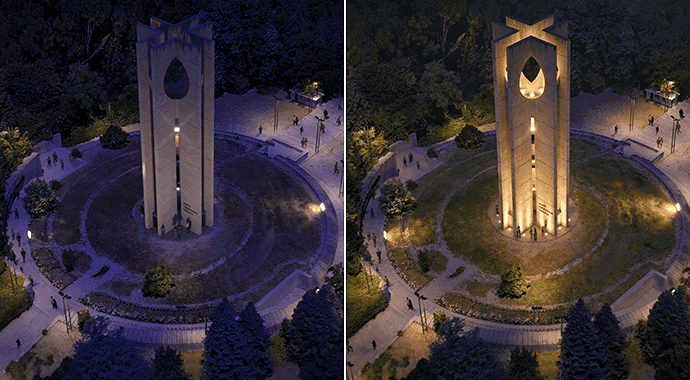
When Chaos first added Gaussian splatting support to V-Ray 7, the significance was in the precedent of a production ray tracer treating splats as first class scene objects, rendered with proper depth, lighting interaction, and camera parallax rather than as a composited overlay. Vantage 3 extended that with real-time GS viewing. With Update 3 for V-Ray, Chaos is closing the gaps that limited how practically GS data could be used inside a professional archviz pipeline.
The news that stuck out straight away is gaussian splatting relighting. Gaussian splat captures bake the lighting conditions present at scan time into the representation itself. The color of each splat encodes the illumination it received. That works fine when viewing the capture in isolation, but the moment you place a scanned environment into a V-Ray scene alongside modeled geometry with its own lighting setup, the baked illumination clashes. Relighting lets artists rebalance that pre-baked illumination so splat assets integrate more naturally with the scene’s V-Ray lighting. The feature is available in V-Ray for 3ds Max, SketchUp, and Rhino.
Beyond relighting, Update 3 extends 3DGS rendering to V-Ray GPU. Previously, splat data could only be rendered on the CPU path. GPU rendering is where most production archviz work happens for speed reasons, so this removes a significant workflow barrier. Clipping volumes for 3DGS data are also new, enabling artists to crop splat captures to isolate just the relevant portion of a scan and cleanly integrate it with modeled scene elements. Animation support for the gaussian splat loader rounds out the 3DGS specific additions.
The broader Update 3 story is about unifying real time and final frame rendering into a single workspace. V-Ray users with a Vantage license can now render in real time at final-frame quality directly inside the V-Ray viewport. No separate application window, no export step. For archviz studios that have been switching between V-Ray for final renders and Vantage for client walkthroughs, this collapses the two into one viewport. AI Mood Match, which analyzes a reference photo and automatically configures V-Ray’s Sun and Sky or IBL to match the lighting atmosphere, is another notable addition aimed at accelerating the early design iteration phase.
V-Ray’s continued investment in 3DGS tooling continues to show excitement from industry leaders. Relighting, GPU rendering, and clipping volumes are the specific tools that archviz professionals need to treat gaussian splat captures as production assets rather than references. Each update narrows the gap between scanned environments and modeled scenes inside the same renderer, which is exactly the trajectory the field needs to see from major commercial tools.
Learn more about the V-Ray updates here.