

Through the Depths of Time is a short film and VR experience that travels through key moments in human history, from early civilisation to the present day. I made it between September 2025 and early 2026 as my MFA thesis at the School of Visual Arts in New York. None of the scenes were captured from reality: every scene began as an AI-generated image, and each was then developed into a 3D space that viewers can explore in VR, mostly using Gaussian splatting. Along the way you meet a caveman, Alexander Fleming discovering penicillin, and Neil Armstrong taking the first step on the Moon.
From the start I wanted the project to have two distinct elements. The film would guide the audience through one continuous journey. The VR version would let viewers enter the same scenes and explore them for themselves. Either way, I didn’t want a sequence of separate images. I wanted the moments to feel connected, like one continuous passage of evolution through time.
Generative AI gave me the images, but an image is flat. You can look at it, but you cannot step inside it. The challenge that shaped the whole project was how to turn these generated moments into spaces with depth that could be entered, explored and linked together through camera movement.
When I began work in September 2025, the available single-image-to-3D tools did not offer the level of detail and consistency I needed for this project. So I built my own method: first generate a 360-degree camera orbit of the scene with Higgsfield, then reconstruct it from the generated views.
In this article I walk through the workflow I developed, the challenges of reconstructing AI-generated imagery, and the possibilities I see in combining generative AI, Gaussian splatting and immersive storytelling.
Scanning subjects that never existed
Gaussian splatting typically reconstructs a 3D scene by optimising a collection of Gaussian primitives from photographs or video frames captured from multiple viewpoints. My subjects had no real-world versions to photograph, so the multi-view footage had to be generated too.
In effect, I used an AI video model as a virtual scanning tool. The camera was synthetic, and so were the depicted subjects, but the footage provided the reconstruction software with a sequence of different views from which to build a 3D representation.
The full pipeline, from image to VR, went like this:
Generate the scene. Each scene began as a concept: a moment in human history I wanted to take the viewer to. I created an AI-generated image of that moment, with the people and objects that would carry it.
Orbit it with an AI camera. I used Higgsfield’s 360 Camera Orbit to generate a video of the camera circling around the people and objects in the scene. The result was synthetic multi-view footage, much like walking around a real subject with a camera. The camera motion and subject consistency were sufficiently coherent for Postshot and Luma AI to reconstruct usable Gaussian splats, despite the inconsistencies inherent in AI-generated footage.
Train and clean the splat. I reconstructed each subject as a Gaussian splat in Postshot and Luma AI, then cleaned it in SuperSplat. For two scenes, I paired a photogrammetry mesh from RealityScan with a Gaussian splat of the same subject and combined the two later in compositing. Two larger environments were generated directly as 3D worlds in World Labs’ Marble.
Build and animate in Unreal. I imported the splats into Unreal Engine, arranged the scenes, designed the camera moves and animated the splats for the film and VR experience.
The sections below go through each stage in more detail.
Training the splats
While making the film and VR experience, I tested the different tools available at the time, but most of my effort went into Gaussian splats trained in Postshot and Luma AI. Both turned the generated orbits into usable reconstructions, but never identically, so I ran each orbit through both and kept whichever result was cleaner and more detailed. Neither tool won consistently, and I needed both.
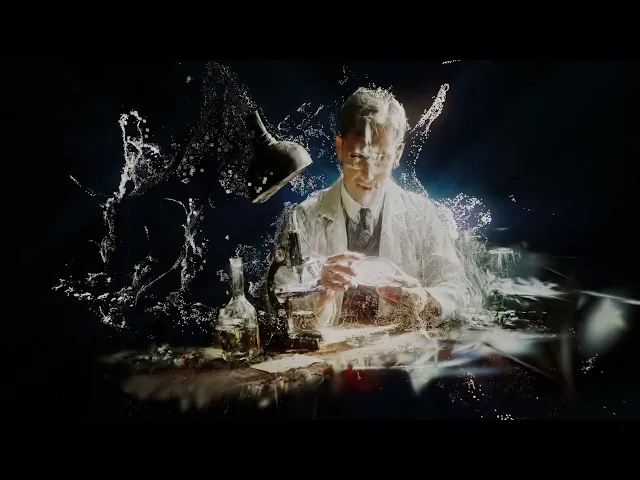
Getting those first splats to work was the pivotal moment of the project. The generated image stopped being a picture and became something I could move around.
While testing tools, I also extracted stills from some of the orbit videos and ran them through RealityScan, Epic’s desktop photogrammetry software, which builds a textured mesh from a set of images rather than a splat. For two scenes I used both: a photogrammetry mesh and a Gaussian splat of the same subject, rendered separately and overlaid in the final compositing step. The mesh gave the scene solid form, while the splat added a softer, more photographic appearance that complemented the mesh.
World Labs’ Marble became available mid-project, and it turned out to be useful for larger environments. It generates a 3D world directly from a prompt or image, without requiring me to create an orbit and reconstruct it myself, so I used it for two of the bigger scenes. The Industrial Revolution section is a good example: the surrounding environment came from Marble, while the train, car and plane were splats I had trained in Postshot, and everything was placed together in one scene in Unreal Engine 5.3. For the film, the final compositing came later, in post-production, once the passes were rendered out.
The challenge of reconstructing AI imagery
The biggest difference from a real capture is consistency. When you film a real object, it stays the same from frame to frame. An AI-generated orbit does not. Small details shift as the camera moves, because the model is inventing each new view rather than recording it.
The reconstruction software assumes it is looking at one stable object. When the views disagree, the reconstruction tries to reconcile them. In my scenes, this showed up as floating artefacts around the subjects and smeared or blurry areas where the views conflicted most.
The clearest example was faces. Across an orbit, a character’s features would shift slightly from one angle to the next, so the reconstruction had no single face to settle on. The result was a face that looked right from the front and softened or doubled as the camera came round, which is exactly where a viewer in VR looks first.
I cleaned and refined each reconstruction in SuperSplat, removing stray splats and tidying the edges of each subject.
Not every artefact had to go. Floating splats and soft edges are usually the enemy in a reconstruction, but they suited a film about memory and time. In the transitions I let the imperfections show: the splats loosen, drift and dissolve, each one moving in its own way, so a scene comes apart like a memory and carries the viewer on through time.
Building the world in Unreal Engine
After cleanup, I exported the splats as PLY files and brought them into Unreal Engine 5.3 using the Luma AI plugin. There I arranged the subjects within their environments, positioned cameras and designed movement through each space in real time.
This is what made the film possible as one continuous journey. Instead of cutting between isolated images, I could move the camera from one moment in history into the next.
I also began animating the splats themselves. Rather than keeping every reconstruction static, I let parts of the splat data drift, fragment and move through space. These transitions became one of the defining elements of the film’s visual language. One moment gradually loosens and morphs into the next, so the scenes feel less like conventional 3D models and more like reconstructed memories, partly stable and partly falling apart, just as happens with human recall.
The Luma plugin renders splats using Unreal’s Niagara particle system, so each scene could be treated as a cloud of particles for animation. In my setup, I could drive their positions and opacity over time: pulling them apart, letting them drift and settling them back into place. The splat data itself became the animation medium.
In the two scenes that used a photogrammetry mesh as well as a splat, the animation worked the same way, but in layers. For the mesh, a Niagara system sampled the mesh surface and spawned particles from it, so the mesh could break apart in its own way. I rendered the mesh animation and the splat animation as separate passes out of Unreal and overlaid them in the final compositing step, which let me control each layer independently. How much each scene moved, drifted or broke apart depended on what that moment in the film needed. For my VR version, the same layered approach wasn’t practical. Everything there renders live, with no compositing step, and running the mesh and the splat together in one real-time scene caused sorting and performance problems in my setup. I therefore chose one layer per VR scene, either the splat or the mesh.
One practical note: the engine version matters. I worked in Unreal Engine 5.3, using a version of the Luma AI plugin compatible with Unreal Engine 5.1–5.3. Anyone attempting to reproduce this particular workflow should check compatibility with their installed engine and plugin versions.
One world, two experiences
The same scenes power both versions of the project, but each one changes the viewer’s relationship to the work.
In the film, I control the camera and guide the audience through the journey. In VR, the viewer becomes the camera. They can look around, walk through the environments and discover the scenes in their own way.
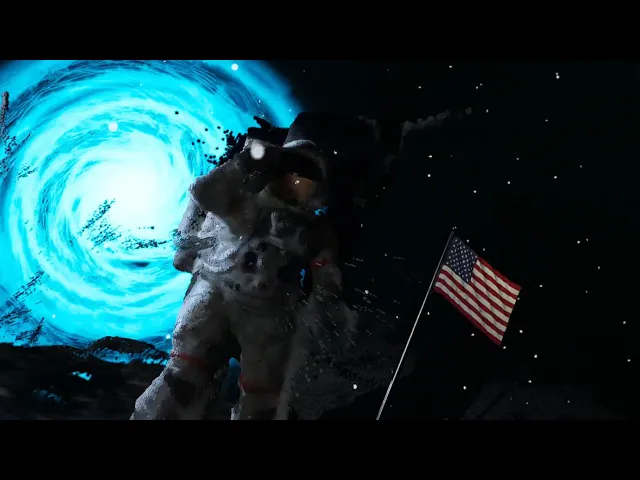
I wanted the audience to go beyond watching a film and physically explore its scenes, walking through spaces that began as nothing more than AI-generated images. Seeing people do that in the exhibition was the moment the project felt complete and my objectives fulfilled.
Splatting as a creative medium
Before moving into AI filmmaking, I worked in VFX and compositing. That background shaped how I approached this project. I didn’t see Gaussian splatting only as a way of capturing reality. I saw it as another creative tool for building cinematic worlds.
Combining it with generative AI opens up something new. We can now reconstruct places and people that never existed, and give audiences the chance to stand inside them. I believe splatting is becoming an imaging medium in its own right, alongside photography and video.
For storytelling, this changes what a scene can be. A film no longer has to end at the edge of the frame. Historical moments, imagined places and characters can become spaces an audience moves through, in VR, in galleries or in education. And because the source is generative, artists can build these worlds without a location, a set or a capture crew.
The field is moving fast. Single-image 3D models such as Apple’s SHARP, TripoSplat and TRELLIS can create 3D representations from one image, but they must infer information that is not visible in the source. SHARP produces a Gaussian representation designed primarily for rendering nearby viewpoints. TripoSplat generates Gaussian splats, while TRELLIS can generate several types of 3D assets, including Gaussian representations and meshes. The quality and consistency of invented views can still vary. The orbit-first route is being automated too, with pipelines emerging that can move from a single still to a reconstructed splat with less manual intervention. Workflows that currently need several tools and a lot of hand cleanup are increasingly being folded into single pipelines.
In the end, this project is about the great turning points of human history, told through a technology that is itself changing how we create and experience moving images. In that sense, technological evolution mirrors humanity’s own progress.
You can see more of the project at marzenamilowska.co.uk/gaussian-splats.